
前回のおさらい
前回はGoogle Apps Scriptでカレンダーに予定を繰り返しルールを設定しました。
繰り返しルールは「毎週月曜日」「翌月末まで」の2つでした。

繰り返しルールを設定するため繰り返し予定オブジェクトをつくりました。
const recurrence = calendarApp.newRecurrence()繰り返し予定オブジェクトに週次のルールを追加しました。
const weeklyRecurrenceRule = recurrence.addWeeklyRule()これだけですと「ルールをつくる」と宣言しただけですので、具体的なルールを定義しました。
const recurrenceRule = weeklyRecurrenceRule.onlyOnWeekday(calendarApp.Weekday.MONDAY).until(new Date('April 30, 2024'))
untilメソッドで「4月末まで」とルールを定義しましたが、これだけですと毎月、翌月末を手動で変えていかなければならず、自動化どころか手動化です。
そこで、今回は翌月末をDateオブジェクトで表現します。
ここまでのコード全体
const setRegularMeeting = () => {
  const calendarApp = CalendarApp
  const recurrence = calendarApp.newRecurrence()
  const weeklyRecurrenceRule = recurrence.addWeeklyRule()
  const recurrenceRule = weeklyRecurrenceRule.onlyOnWeekday(calendarApp.Weekday.MONDAY).until(new Date('April 30, 2024'))
}
全体として実現したいこと
- カレンダーへの追加は毎月1日に翌月分を入れる
- 定例会議は毎週月曜日の10時から行われる
- 祝日は定例会議の予定が入らない
- 開始時刻の1時間前にチャットに定例会議の予定が通知される
- 予定に定型の議事録をくっつける
- 毎週金曜日に翌週の定例会議の議題を議事録に記入するよう参加者に通知する
Dateオブジェクトで翌月末を表現する
Dateクラスを具現化したものがDateオブジェクトです。
クラスはひな型みたいなもので、ひな型を具体化したものがオブジェクトです。
クラスとオブジェクトは、金型と製品のような関係です。
Dateクラスは日付を扱うときに利用するやつで、上のコードではuntilの中で使っています。
const recurrenceRule = weeklyRecurrenceRule.onlyOnWeekday(calendarApp.Weekday.MONDAY).until(new Date('April 30, 2024'))new Date(‘April 30, 2024’)というのは4月30日という意味になります。
翌月末を表現したいので少し書き換えます。
翌月末を表現するコード
const current = new Date()
const nextMonth = new Date(current.getFullYear(), current.getMonth() + 2, 0)
console.log(nextMonth)
実行結果
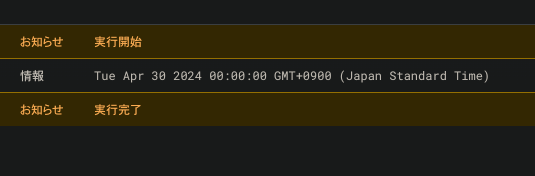
実行結果を見ると2024年4月30日となっていますのでうまくいってますね。
new Date( )とは?
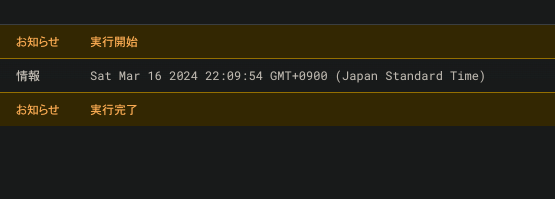
new Date( )と書くことで本日の日付を取得できます。
const current = new Date()
console.log(current)
実行結果
年月日を取り出す
current変数には本日の日付が入っていて、日付から年を取り出すにはgetFullYearメソッドを使います。
const current = new Date()
console.log(current.getFullYear())
実行結果

同様に月を取り出すにはgetMonthメソッドを使います。getMonthで取得できるのは当月の配列番号です。
const current = new Date()
console.log(current.getMonth())
console.log(current.getMonth() + 1)
実行結果
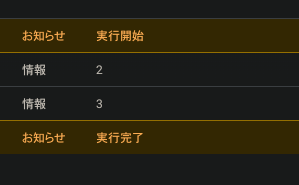
getMonthメソッドで当月を取得したはずが2と出力されています。(当月は3月)
月の配列番号は0から始まるので0は1月、1は2月、2は3月をあらわします。
ですので、3月が「2」と出力されるのは問題ありません。
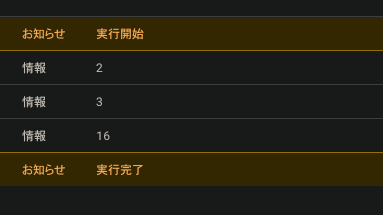
本日の日を取り出すにはgetDateメソッドを使います。
const current = new Date()
console.log(current.getMonth())
console.log(current.getMonth() + 1)
console.log(current.getDate())
実行結果(本日は16日)
月末を表現する
月末は30日だったり、31日だったり、28日、29日だったりします。
月末を表現するには0とします。ただし、0は当月末ではなく前月末をあらわします。
ですので翌月を指定(getMonth() + 1)し、日付を0とすることで当月末を表現できます。
当月末を表現するコード
const current = new Date()
const currentMonthLastDay = new Date(current.getFullYear(), current.getMonth() + 1, 0)
console.log(currentMonthLastDay)
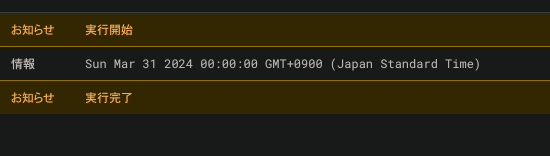
実行結果(2024年3月31日を取得)
では翌月末を表現します
const current = new Date()
const nextMonthLastDay = new Date(current.getFullYear(), current.getMonth() + 2, 0)
console.log(currentMonthLastDay)
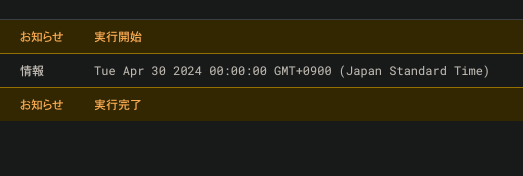
実行結果(2024年4月30日を取得)
というわけで翌月末を表現できましたね。
ではコードに翌月末を表現してuntilメソッドに突っ込みましょう。
コード全体
const setRegularMeeting = () => {
  const current = new Date()
  const nextMonthLastDay = new Date(current.getFullYear(), current.getMonth() + 2, 0)

  const calendarApp = CalendarApp
  const recurrence = calendarApp.newRecurrence()
  const weeklyRecurrenceRule = recurrence.addWeeklyRule()
  const recurrenceRule = weeklyRecurrenceRule.onlyOnWeekday(calendarApp.Weekday.MONDAY).until(nextMonthLastDay)
}
これで無事に「毎週月曜日」「翌月末まで」というルールを設定できました。
次回はここまででつくった繰り返しイベントルールをもとに定期イベントをつくります。
ファォッ