
前回のおさらい
前回はDateオブジェクトを使って翌月末を表現しました。

Dateオブジェクトで本日を表現しました。
const current = new Date()本日から起算して翌月末はこのようにあらわしました。
const nextMonthLastDay = new Date(current.getFullYear(), current.getMonth() + 2, 0)getMonth() + 2で翌々月を取得しています。さらに日付に0を指定することで取得した月の前月末をあらわせます。
よって、上のコードは翌月末を表現することになります。
ここまでのコード全体
const setRegularMeeting = () => {
  const current = new Date()
  const nextMonthLastDay = new Date(current.getFullYear(), current.getMonth() + 2, 0)

  const calendarApp = CalendarApp
  const recurrence = calendarApp.newRecurrence()
  const weeklyRecurrenceRule = recurrence.addWeeklyRule()
  const recurrenceRule = weeklyRecurrenceRule.onlyOnWeekday(calendarApp.Weekday.MONDAY).until(nextMonthLastDay)
}
全体として実現したいこと
- カレンダーへの追加は毎月1日に翌月分を入れる 済
- 定例会議は毎週月曜日の10時から行われる
- 祝日は定例会議の予定が入らない
- 開始時刻の1時間前にチャットに定例会議の予定が通知される
- 予定に定型の議事録をくっつける
- 毎週金曜日に翌週の定例会議の議題を議事録に記入するよう参加者に通知する
今回は実際に定例会議の予定をカレンダーに入れていきます。
カレンダーを取得する – getDefaultCalendarメソッド
カレンダーに予定を入れるために自分のカレンダーを取得します。
const defaultCalendar = calendarApp.getDefaultCalendar()
自分のカレンダーオブジェクトを取得したら次に定期的な予定を作成します。
定期的な予定を作成する – createEventSeriesメソッド
定期的な予定を作成するにはcreateEventSeriesメソッドを使います。
このように書くと定期的な予定の作成ができます。
const eventSeries = defaultCalendar.createEventSeries(title, startTime, endTime, recurrenceRule)
このメソッドは引数を4つとります。
それぞれの引数はこうなっています。
- title ー 予定のタイトル
- startTime ー 予定の開始日時
- endTime ー 予定の終了日時
- recurrenceRule ー 予定の繰り返しルール
引数にぶちこむ値を一つずつ定義していきます。
title – 予定のタイトル
予定のタイトルは「定例会議ですよ!」にします。
const title = '定例会議ですよ!'startTime – 予定の開始日時
開始日時は翌月の第1月曜日です。
第1月曜日が毎月同じ日だったらいいんですが、世の中うまいこといきません。月によって変わります。
そこで翌月の第1月曜日の日を取得します。
const dayIndex = new Date(current.getFullYear(), current.getMonth() + 1, 1).getDay()
const firstDay = (9 - dayIndex) % 7 === 0 ? 7 : (9 - dayIndex) % 7
これが何をやっているかを説明します。
DateオブジェクトのgetDayメソッドは曜日を配列番号で取得します。
配列番号と曜日はこんな感じになってます。
- 0:日曜日
- 1:月曜日
- 2:火曜日
- 3:水曜日
- 4:木曜日
- 5:金曜日
- 6:土曜日
翌月の1日の曜日を配列番号で取得してdayIndex変数に入れてます。
dayIndex変数が1だったら翌月の1日は月曜日なので、第1月曜日も1日になります。
仮にdayIndex変数が2だったら翌月の1日は火曜日なので、第1月曜日は7日です。
同様にdayIndex変数が3だったら翌月の1日は水曜日なので、第1月曜日は6日です。
このロジックを式で表すと、
9 – dayIndex = 第1月曜日の日
となります。
ところが1日が日曜日や月曜日だった場合は、上の計算式にあてはめると、
9 – 0 = 9、9 – 1 = 8 となってしまいます。
そこで%を使った剰余演算をしているんですね。(7で割ったときのあまりを求めている)
ただし、dayIndexが2だった場合(火曜日)は割り切れてしまうので、割り切れた場合は7を代入してます。
const firstDay = (9 - dayIndex) % 7 === 0 ? 7 : (9 - dayIndex) % 7
これで開始日時の日が取得できました。
開始時間は10時ですので開始日時全体はこのように書くことができます。
const startTime = new Date(current.getFullYear(), current.getMonth() + 1, firstDay, 10, 0, 0)endTime – 予定の終了日時
終了時間は11時ですので、終了日時はこのようになります。
const endTime = new Date(current.getFullYear(), current.getMonth() + 1, firstDay, 11, 0, 0)recurrenceRule – 予定の繰り返しルール
予定の繰り返しルールは前回まででrecurrenceRuleに定義しています。
これらを全部つなげて書きますとこのようになります。
const setRegularMeeting = () => {
  // 翌月末を取得
  const current = new Date()
  const nextMonthLastDay = new Date(current.getFullYear(), current.getMonth() + 2, 0)

  // 繰り返しルールを設定
  const calendarApp = CalendarApp
  const recurrence = calendarApp.newRecurrence()
  const weeklyRecurrenceRule = recurrence.addWeeklyRule()
  const recurrenceRule = weeklyRecurrenceRule.onlyOnWeekday(calendarApp.Weekday.MONDAY).until(nextMonthLastDay)

  // 定例会議の名称、当月最初の定例会議の開始日時、終了日時を設定
  const title = '定例会議ですよ!'
  const dayIndex = new Date(current.getFullYear(), current.getMonth() + 1, 1).getDay()
  const firstDay = (9 - dayIndex) % 7 === 0 ? 7 : (9 - dayIndex) % 7
  const startTime = new Date(current.getFullYear(), current.getMonth() + 1, firstDay, 10, 0, 0)
  const endTime = new Date(current.getFullYear(), current.getMonth() + 1, firstDay, 11, 0, 0)

  // 予定の繰り返しを作成
  const defaultCalendar = calendarApp.getDefaultCalendar()
  const eventSeries = defaultCalendar.createEventSeries(title, startTime, endTime, recurrenceRule)
  console.log(eventSeries.getTitle())
}
実行結果
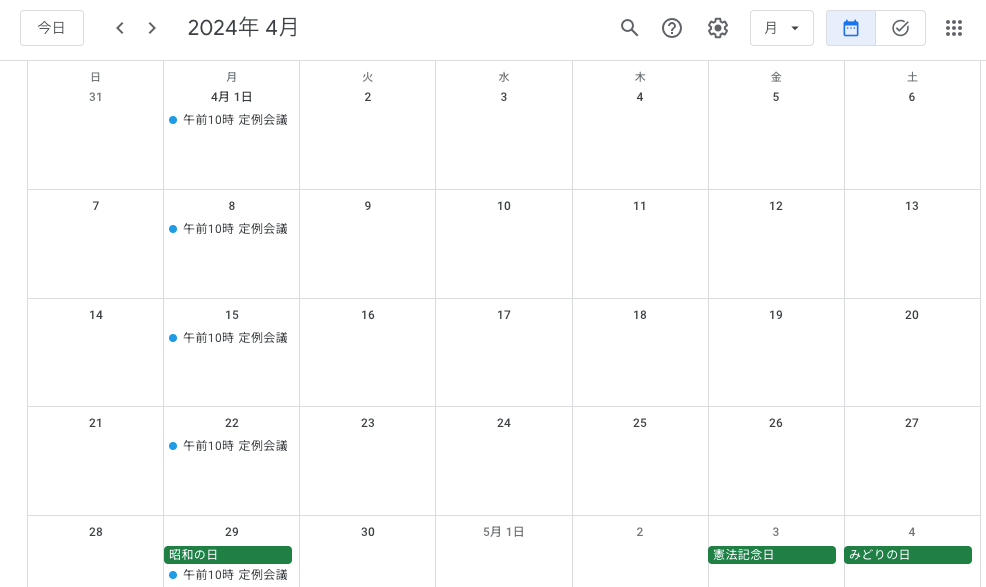
ほい、これで定例会議の予定をつくることができました。
やったぜ!と思いたいところですが、なんと昭和の日に定例会議をやることになっちゃってるじゃないですか!
祝日に仕事なんかしたくないよ、ママン。
というわけで次回は祝日に定例会議が入らないように微調整します。
ディスイズイット