
前回のおさらい
前回はGmailAppのsearchメソッドを使ってスレッドオブジェクトの配列を取得しました。
そしてスレッドオブジェクトの配列からメッセージオブジェクトを取得し、さらに本文のテキストを獲得しました。

スレッドオブジェクトの配列を操作するときはmapメソッドを使いました。
const messages = searchedMail.map(thread => {
    return thread.getMessages()
  })
mapメソッドで作成したメッセージオブジェクトの配列から該当のメッセージオブジェクトを取得しました。
const message = messages[0][0]
メッセージオブジェクトのメソッドgetPlainBodyを使って本文を獲得しました。
const messageBody = message.getPlainBody()
コード全体としてはこのようになっています。
const searchGmail = () => {
  const gmail = GmailApp
  const searchedMail = gmail.search('from:株式会社 インボイス送信元 subject: 【請求書】送付のご案内 is:unread')
  const messages = searchedMail.map(thread => {
    return thread.getMessages()
  })
  const message = messages[0][0]
  const messageBody = message.getPlainBody()
  console.log(messageBody)
}
最終的にはメールに添付された請求書ファイルをGoogleドライブに保存して、保存場所と税抜請求額と税込請求額をチャットツールで通知するのがゴールです。
今回は本文から税抜請求額と税込請求額を抜き出します。
税抜請求額と税込請求額という文言を見つける
請求書メールはこのようになっています。
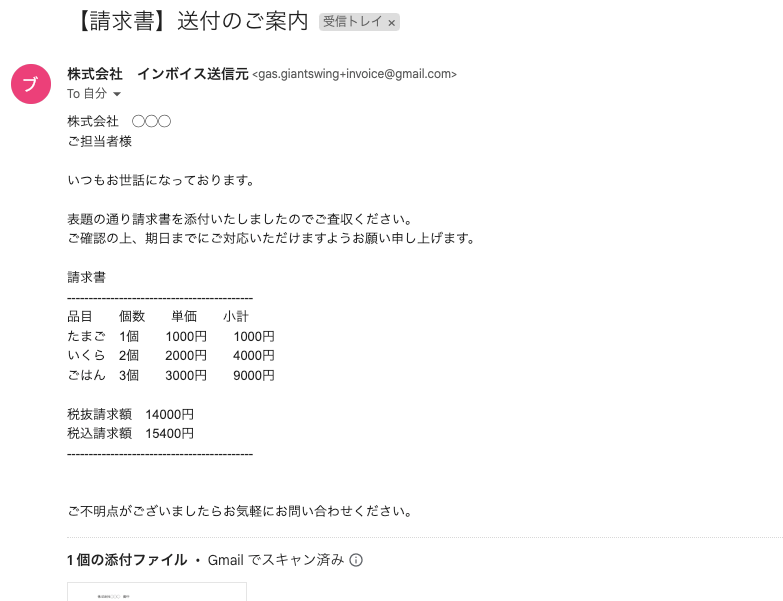
必要なのは税抜請求額の14000円と、税込請求額の15400円です。他の文言は一切必要なく、この2行だけを抜き出したいのですね。
matchメソッドと正規表現で本文から抜き出す
文章中から特定の文言を見つけるにはmatchメソッドと正規表現を使います。
matchメソッドは文字列に対して使用できる命令で、何らかの条件にマッチする部分を抜き出せます。
正規表現を書く
メール本文に注目すると、税抜請求額という文言のうしろに金額があり、税込請求額も同様です。
つまり、メール本文中から税抜請求額と税込請求額という文言を検索して、その行を抜き出せばいいことがわかります。
正規表現はそれぞれ以下のようになります。
- /税抜請求額.*$/m
- /税込請求額.*$/m
「税抜請求額、税込請求額の後ろに任意の文字列がある行末の文言を複数行にわたって検索する」くらいの意味です。
- / 正規表現の始まりと終わりにつける
- .* 後ろに任意の文字列がある
- $ 行末
- m 複数行にわたる
matchメソッドを使う
正規表現が書けたらいよいよmatchメソッドを使って本文を検索していきます。
税抜請求額
const taxNotIncluded = messageBody.match(/税抜請求額.*$/m)
税込請求額
const taxIncluded = messageBody.match(/税込請求額.*$/m)
matchメソッドの使い方です。
messageBodyは文字列型の変数なのでmessageBody.matchでmatchメソッドが使えるんですね。
では実行します。
const searchGmail = () => {
  const gmail = GmailApp
  const searchedMail = gmail.search('from:株式会社 インボイス送信元 subject: 【請求書】送付のご案内 is:unread')
  const messages = searchedMail.map(thread => {
    return thread.getMessages()
  })
  const message = messages[0][0]
  const messageBody = message.getPlainBody()
  const taxNotIncluded = messageBody.match(/税抜請求額.*$/m)
  const taxIncluded = messageBody.match(/税込請求額.*$/m)
  console.log(taxNotIncluded)
  console.log(taxIncluded)
}
実行結果
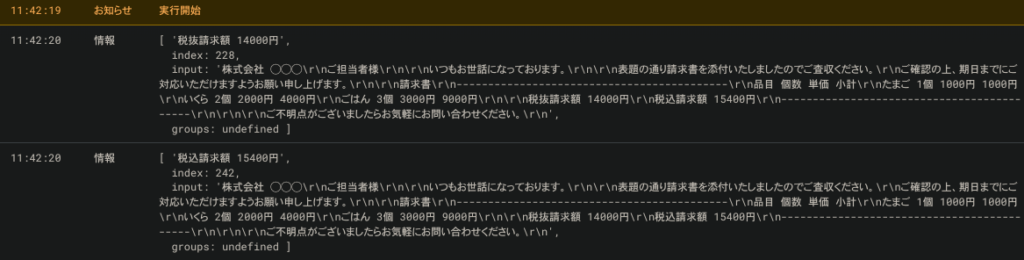
検索にヒットした文字列と、その他の情報の配列を取得しました。必要なのは検索ヒットした文字列だけで、配列の1番目にありますので[0]と指定すれば良さそうです。
const searchGmail = () => {
  const gmail = GmailApp
  const searchedMail = gmail.search('from:株式会社 インボイス送信元 subject: 【請求書】送付のご案内 is:unread')
  const messages = searchedMail.map(thread => {
    return thread.getMessages()
  })
  const message = messages[0][0]
  const messageBody = message.getPlainBody()
  const taxNotIncluded = messageBody.match(/税抜請求額.*$/m)[0] // 末尾に[0]を付け足し
  const taxIncluded = messageBody.match(/税込請求額.*$/m)[0] // 末尾に[0]を付け足し
  console.log(taxNotIncluded)
  console.log(taxIncluded)
}
すると、実行結果はこのようになります。
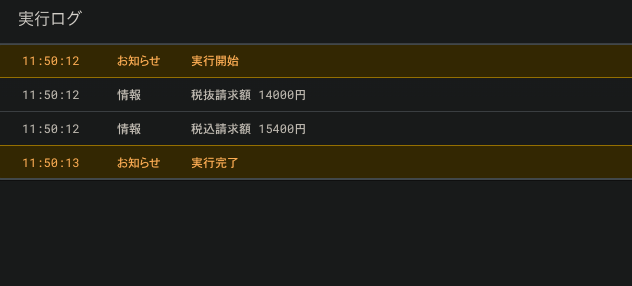
なんだかだいぶゴールに近づいている気がしますね。折り返し地点まできた感じでしょうか。
次回は添付ファイルを取得してGoogleドライブに保存します。
ラーコーン