
前回のおさらい
前回は繰り返しルールをもとにして定期的な予定を作成しました。

定期的な予定を作成するためにgetDefaultCalendarメソッドを使って自分のカレンダーを取得しました。
const defaultCalendar = calendarApp.getDefaultCalendar()createEventSeriesメソッドを使って定期的な予定を作成しました。
const eventSeries = defaultCalendar.createEventSeries(title, startTime, endTime, recurrenceRule)開始日時、終了日時を翌月の第1月曜日の10時〜11時としました。
const dayIndex = new Date(current.getFullYear(), current.getMonth() + 1, 1).getDay()
const firstDay = (9 - dayIndex) % 7 === 0 ? 7 : (9 - dayIndex) % 7
const startTime = new Date(current.getFullYear(), current.getMonth() + 1, firstDay, 10, 0, 0)
const endTime = new Date(current.getFullYear(), current.getMonth() + 1, firstDay, 11, 0, 0)
ところがこれでは祝日にも定例会議の予定が入ってしまいます。祝日は定例会議の予定が入ってほしくありません。
今回は祝日に入ってしまった定例会議の予定を削除するために、祝日を取得します。
取得した祝日と同じ日の定例会議をあとで削除しようという寸法です。
ここまでのコード全体
const setRegularMeeting = () => {
  // 翌月末を取得
  const current = new Date()
  const nextMonthLastDay = new Date(current.getFullYear(), current.getMonth() + 2, 0)

  // 繰り返しルールを設定
  const calendarApp = CalendarApp
  const recurrence = calendarApp.newRecurrence()
  const weeklyRecurrenceRule = recurrence.addWeeklyRule()
  const recurrenceRule = weeklyRecurrenceRule.onlyOnWeekday(calendarApp.Weekday.MONDAY).until(nextMonthLastDay)

  // 定例会議の名称、当月最初の定例会議の開始日時、終了日時を設定
  const title = '定例会議ですよ!'
  const dayIndex = new Date(current.getFullYear(), current.getMonth() + 1, 1).getDay()
  const firstDay = (9 - dayIndex) % 7 === 0 ? 7 : (9 - dayIndex) % 7
  const startTime = new Date(current.getFullYear(), current.getMonth() + 1, firstDay, 10, 0, 0)
  const endTime = new Date(current.getFullYear(), current.getMonth() + 1, firstDay, 11, 0, 0)

  // 予定の繰り返しを作成
  const defaultCalendar = calendarApp.getDefaultCalendar()
  const eventSeries = defaultCalendar.createEventSeries(title, startTime, endTime, recurrenceRule)
  console.log(eventSeries.getTitle())
}
全体として実現したいこと
- カレンダーへの追加は毎月1日に翌月分を入れる 済
- 定例会議は毎週月曜日の10時から行われる 済
- 祝日は定例会議の予定が入らない
- 開始時刻の1時間前にチャットに定例会議の予定が通知される
- 予定に定型の議事録をくっつける
- 毎週金曜日に翌週の定例会議の議題を議事録に記入するよう参加者に通知する
祝日を取得する
祝日を取得するメソッドがあるのかと思って目を皿のようにしておりましたが、それっぽいものは見つかりません。
祝日を登録しているのは祝日登録専用のアカウントです。

このアカウントのカレンダーを取得して、祝日イベントを取得すれば良さそうです。
自分以外のカレンダーを取得するにはカレンダーIDが必要です。
カレンダーIDの取得
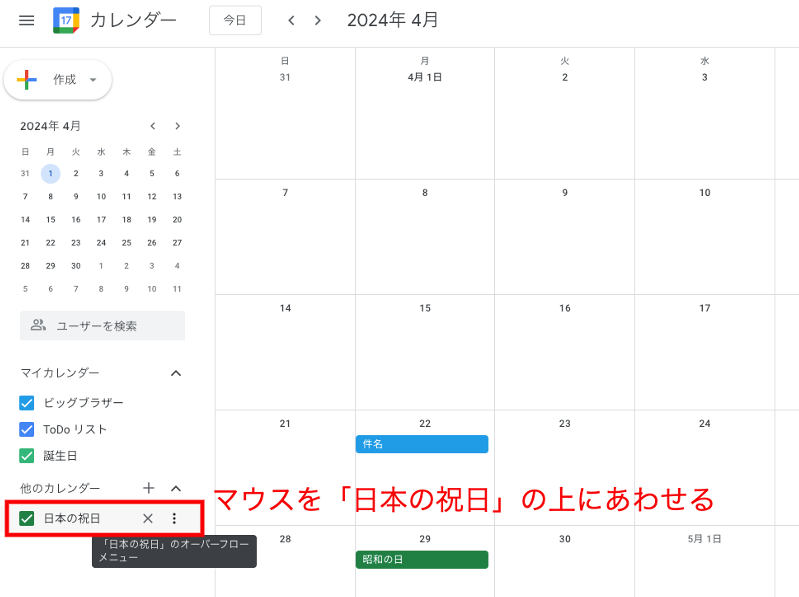
「日本の祝日」の上にマウスをあわせて3つの点が並んだところをクリック
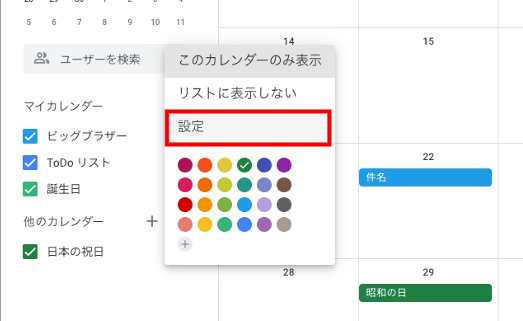
メニューの設定をクリック
設定画面の「カレンダーの統合」の「カレンダーID」をコピー
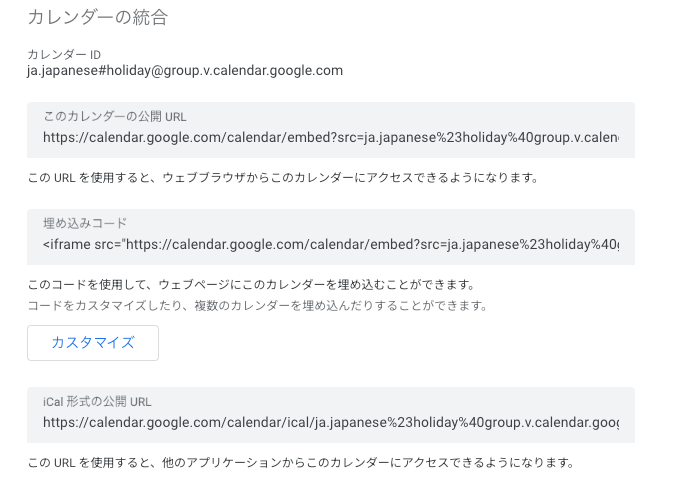
カレンダーIDはこれです。
カレンダーID
ja.japanese#holiday@group.v.calendar.google.com
カレンダーオブジェクトを取得
祝日アカウントのカレンダーIDをゲットしたので祝日アカウントのカレンダーオブジェクトを取得しましょう
const calendarApp = CalendarApp
const holidayCalendar = calendarApp.getCalendarById('ja.japanese#holiday@group.v.calendar.google.com')
これでカレンダーオブジェクトの取得が完了です。
祝日イベントを取得する
祝日カレンダーに登録された祝日イベントを取得します。複数のイベントを取得するにはgetEventsメソッドを使います。
const holidays = holidayCalendar.getEvents(nextMonthFirstDay, nextMonthLastDay)
console.log(holidays[0].getDescription())
console.log(holidays[0].getTitle())getEventsメソッドのstartには取得期間の始まりを、endには取得期間の終わりを入れます。
翌月の1日から、翌月末までの祝日を取得したいので、nextMonthFirstDayとnextMonthLastDayを定義します。
翌月1日
const nextMonthFirstDay = new Date(current.getFullYear(), current.getMonth() + 1, 1)翌月末
const nextMonthLastDay = new Date(current.getFullYear(), current.getMonth() + 2, 0)
祝日イベント取得のコード
const nextMonthFirstDay = new Date(current.getFullYear(), current.getMonth() + 1, 1)
const nextMonthLastDay = new Date(current.getFullYear(), current.getMonth() + 2, 0)
const holidays = holidayCalendar.getEvents(nextMonthFirstDay, nextMonthLastDay)
console.log(holidays[0].getDescription())
console.log(holidays[0].getTitle())
実行結果

うまく取得できていそうですね。
コード全体はこんな感じになりました。
const setRegularMeeting = () => {
  // 翌月末を取得
  const current = new Date()
  const nextMonthLastDay = new Date(current.getFullYear(), current.getMonth() + 2, 0)

  // 繰り返しルールを設定
  const calendarApp = CalendarApp
  const recurrence = calendarApp.newRecurrence()
  const weeklyRecurrenceRule = recurrence.addWeeklyRule()
  const recurrenceRule = weeklyRecurrenceRule.onlyOnWeekday(calendarApp.Weekday.MONDAY).until(nextMonthLastDay)

  // 定例会議の名称、当月最初の定例会議の開始日時、終了日時を設定
  const title = '定例会議ですよ!'
  const dayIndex = new Date(current.getFullYear(), current.getMonth() + 1, 1).getDay()
  const firstDay = (9 - dayIndex) % 7 === 0 ? 7 : (9 - dayIndex) % 7
  const startTime = new Date(current.getFullYear(), current.getMonth() + 1, firstDay, 10, 0, 0)
  const endTime = new Date(current.getFullYear(), current.getMonth() + 1, firstDay, 11, 0, 0)

  // 予定の繰り返しを作成
  const defaultCalendar = calendarApp.getDefaultCalendar()
  const eventSeries = defaultCalendar.createEventSeries(title, startTime, endTime, recurrenceRule)

  // 翌月の祝日を取得
  const holidayCalendar = calendarApp.getCalendarById('ja.japanese#holiday@group.v.calendar.google.com')
  const nextMonthFirstDay = new Date(current.getFullYear(), current.getMonth() + 1, 1)
  const holidays = holidayCalendar.getEvents(nextMonthFirstDay, nextMonthLastDay)
  console.log(holidays[0].getDescription())
  console.log(holidays[0].getTitle())
}
※ nextMonthLastDayは上のほうですでに定義済です
次回は定期的な予定として作成された定例会議のうち、祝日を削除していきます。
日本のどこかで〜